


Every marketing team has the homepage problem. One banner trying to speak to new visitors, returning customers, partners, and job seekers all at once. A returning customer who meets the same introductory offer for the fifth time. A partner scrolling past consumer content to find the one page they need. A campaign page that performs fine on average and well for nobody in particular.
Liferay DXP builds targeting tools into the platform to deal with exactly that. The tools are the easy part. Deciding who to target, with what, and when to stop is where the real work sits.
The Building Blocks: Segments, Experiences, and Variations
Liferay’s personalization rests on three ideas. A segment is a group of users who share something, such as a role, a location, or a behavior. An experience is a version of a content page tailored to a segment, with different text, images, widgets, or even a different layout. A personalized variation does the same job for a collection, changing which items a segment sees in a list.
Liferay describes these as tools available out of the box. Once segments exist, you map them to experiences, and the platform shows each visitor the version that matches. Segments can also be assigned roles, so a group defined by attributes or behavior can be given access to content in the same way a manually maintained user group would be. That makes segmentation useful for access and relevance together, which suits portals and intranets particularly well.
What You Can Segment On
The Segment Builder groups people by several kinds of signal.
- User properties, such as job title, sites, roles, registration date, and custom fields you define.
- Session properties, such as the page a visitor is on, cookies, browser, and device. These work for anonymous visitors too, because they come from the current visit and need no login.
- Geolocation based on IP address, in versions that support it.
- Combinations of the above, using logical operators or compound segments that build on existing ones.
The difference between user and session criteria matters in practice. A logged-in employee can be segmented by department. An anonymous visitor from a search campaign can only be segmented by what the visit itself reveals.
Personalizing Pages With Experiences
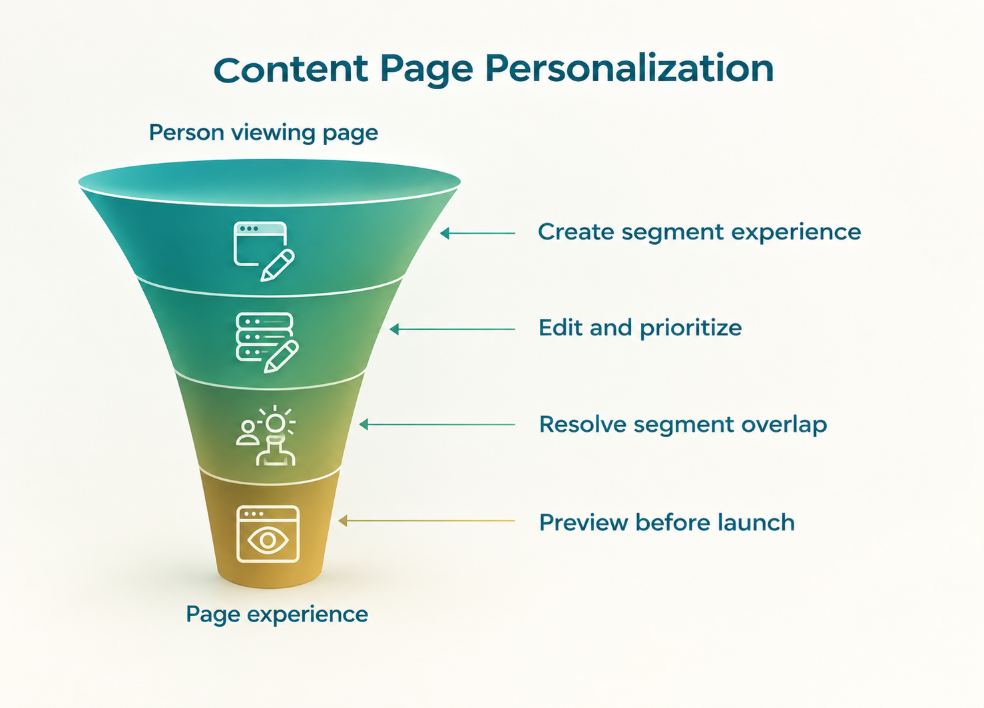
Content page personalization changes a page’s layout and content for the person viewing it. You create an experience for a segment, edit it as you would any page, and set an order of priority. The default experience stays in place for everyone who matches no segment, so it needs to be good on its own.
Priority is the detail that trips teams up. A person can belong to several segments at once, a returning customer who is also in a particular region, for instance. When that happens, the experience ranked highest wins. If nobody sets the order deliberately, the outcome depends on whatever order the experiences happened to be created in. Liferay also lets editors preview a page as a given segment before it goes live, which is worth using on every launch.
Personalizing Lists With Collection Variations
Collections power the lists across a site: featured articles, product tiles, news, resources. By default, everyone belongs to the Anyone variation and sees the same items. Personalized variations let a segment see a different selection.
For people who sit in more than one segment, Liferay offers two approaches. You can prioritize variations, so one clear selection wins. Or you can combine entries from every segment the person belongs to, which produces a broader mix. Prioritizing keeps a message focused. Combining keeps a list full. The right choice depends on what the page is for.
Local Segments and Analytics Cloud Segments
Liferay draws a useful line between the two kinds of segment. Segments created inside DXP use only data DXP holds, built from user fields, session attributes, and cookies, with identity tied to a single DXP site. Liferay describes them as good for limited, short-term personalization.
Segments created in Analytics Cloud can draw on data from multiple sources, build on interests and historical behavior, and resolve a person’s identity across several DXP sites. Liferay describes those as suited to expansive, long-term personalization. Analytics Cloud segments sync down to DXP for use there, while DXP segments stay local. Liferay’s recent releases are also moving segments toward a unified experience with Analytics Cloud, so teams should plan around the version they actually run.
A Simple Example
Take a partner portal with three tiers. The default experience shows general announcements and the public resource library. A segment built on each partner’s tier role then gets its own experience, with the campaigns, pricing guidance, and training that belong to that tier. Priority is set so the highest tier wins for anyone who qualifies twice. The team then watches one concrete number, such as how often partners open the tier-specific resources, and compares it with the default page. This is an illustration of the pattern, not a recipe for every portal, but it shows how much can be done with two or three well-chosen segments.
Where This Pays Off
- An employee intranet that shows each department and office its own announcements, forms, and tools.
- A partner portal where each tier sees the resources, pricing guidance, and campaigns meant for it.
- A public site that greets first-time visitors differently from returning ones.
- Regional content and offers, shown according to location.
- A customer service area that surfaces content for the products a customer actually owns.
Where Personalization Goes Wrong
- Too many segments, built enthusiastically and maintained by nobody.
- Overlapping segments with no priority rules, so people see pages that change unpredictably.
- Personalizing before any variant content exists, which produces experiences that look identical.
- Guessing from thin data, so the targeting is confident and wrong.
- Using signals visitors would not expect. Behavioral and personal data carry privacy and consent obligations, and personalization should respect them.
- Never revisiting segment rules after the business changes.
Measure, Then Expand
The sensible way to begin is small. Pick one page and one segment where the business has a clear question, such as whether returning customers respond to a different call to action. Keep the default version running as a comparison, review the segment’s analytics, and expand only where the variation earns its upkeep. Every extra variant is content someone has to write, review, and keep current, so give each segment a named owner who is responsible for keeping its rules and its content up to date.
Why the Build Needs a Real Partner
The tools do not tell you which segments matter. That comes from understanding the audience, the content team’s capacity, and the questions the business wants answered. Good Liferay implementation services start there: choosing a small number of segments tied to real goals, agreeing priority rules, planning the variant content, and connecting analytics so results can be read. A Liferay Solution Partner earns the label by helping a team say no to the fifteenth segment.
Some organizations arrive with personalization already in place, in older Audience Targeting rules or in another tool. Moving that onto Liferay DXP segments and experiences takes inventory and judgment. Careful Liferay Migration Services list what exists, translate the rules that still serve a purpose, retire the ones nobody remembers, and test each result before anything reaches visitors.
Where Sahana System Limited Fits In
As a Liferay Solution Partner, Sahana System Limited helps teams design personalization around the business questions they need answered. Some engagements are Liferay implementation services for organizations setting up segments, experiences, and measurement on Liferay DXP for the first time. Others are Liferay Migration Services for organizations moving older personalization rules onto the current tools.
Good personalization leaves no trace. The visitor finds the page relevant, the partner finds their tier’s resources first, and nobody remarks on how it happened.
Frequently Asked Questions
Want Your Content to Speak to the Right Audience?
Talk to Sahana System Limited's Liferay team about a free Personalization Assessment: a focused look at your audiences, your content, and where Liferay DXP targeting would make the biggest difference first.
healthcare-biomedical-technology →